How I Built an AI-Powered SaaS Product in 24 Hours on a $5 Server
The story of a whiteboard frustration, a late-night coding session, and the absurdly fun journey of shipping a real product before the motivation wore off.
Let me set the scene.
It's a Tuesday. I'm sitting in a conference room with a team of engineers. We're working on a big greenfield project, the kind where nothing exists yet and everything needs to be designed from scratch. Someone pulls up Miro. The plan is to sketch out the system architecture together. Services, data flows, API boundaries, the whole picture.

Loop Engineering: Agents That Run While You Sleep
Closed loops that discover work, verify results, and schedule their own next run — battle-tested patterns for Claude, OpenAI, and MCP. No toy demos.
Buy the Book!Within fifteen minutes, the meeting has derailed.
Someone can't find the connector tool. Someone else accidentally moved three boxes while trying to scroll. The arrows don't snap to where you want them. Two people are editing the same region of the canvas and fighting for control of a rectangle. One person has given up entirely and is just typing notes in a text box floating in the corner of the canvas like a digital post-it note of surrender.
We are a room full of software engineers, and we are being defeated by a diagramming tool.
I'm watching this unfold, and a memory from three weeks earlier pops into my head. A memory that's about to cost me a lot of sleep and make me very, very happy.
Three Weeks Earlier: The Mermaid Moment
I'd been working on a different project, using Claude Code to help me move fast through a big codebase. At one point I asked it to self-document the application, and buried in the output was something I hadn't seen before: a diagram written in Mermaid.js.
Mermaid is a markup language for diagrams. You write something that looks like pseudocode, and it renders into a flowchart, or a sequence diagram, or a state machine, or an entity relationship diagram. It's like Markdown, but for visuals. Here's the wild part: because it's text-based, LLMs can write it. An AI model doesn't need to understand pixels or coordinates or SVG paths. It just needs to output structured text, which is exactly what language models are good at.
I remember thinking, "huh, that's cool," and then moving on with my day. Filed it away in the back of my brain under "neat things that might matter later."
Three weeks later, sitting in that conference room watching my colleagues wrestle with drag-and-drop boxes, the filed-away thought came roaring back. And this time it had teeth.
The Idea That Wouldn't Let Go
What if there was a diagramming tool where you didn't touch the diagram at all?
No toolbar. No shape palette. No alignment guides. No "which layer is this on" confusion. No accidentally nudging a box when you meant to click on a different box. You just… describe what you want. In plain English. And an AI draws it for you.
"Draw a flowchart showing user authentication with email verification and OAuth fallback."
And it appears. Right there. A real diagram. Rendered and ready.
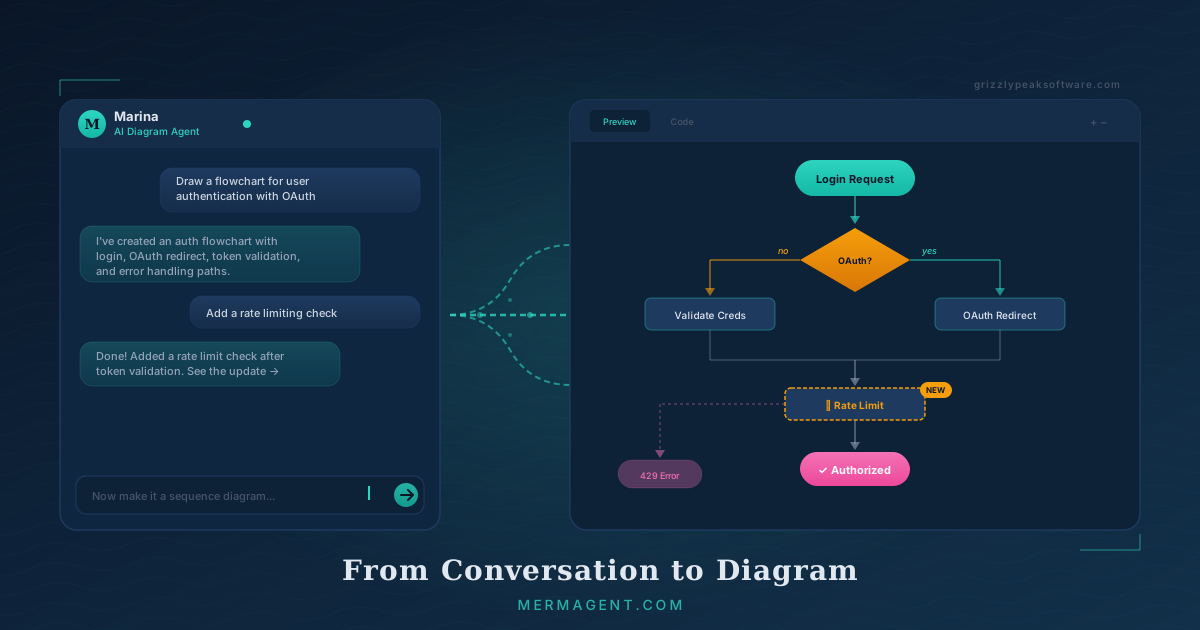
Want to change something? You don't grab a node and drag it. You say, "add an error handling path for invalid tokens." And it updates. Every change is a message in a conversation. Every version is saved automatically. The conversation IS the edit history.
I could feel the idea taking shape even as the meeting dragged on. I was nodding along to a discussion about microservice boundaries while mentally sketching out a database schema. By the time I got home that evening, I knew I was going to build it. Not next week. Not after I planned it out on a whiteboard (the irony of which was not lost on me). That night.
I opened my terminal, fired up Claude Code, and said, "Let's build something."
The First Night: Prototype in Hours
The first working version of MermAgent came together faster than I expected, which is not a sentence I get to write very often.
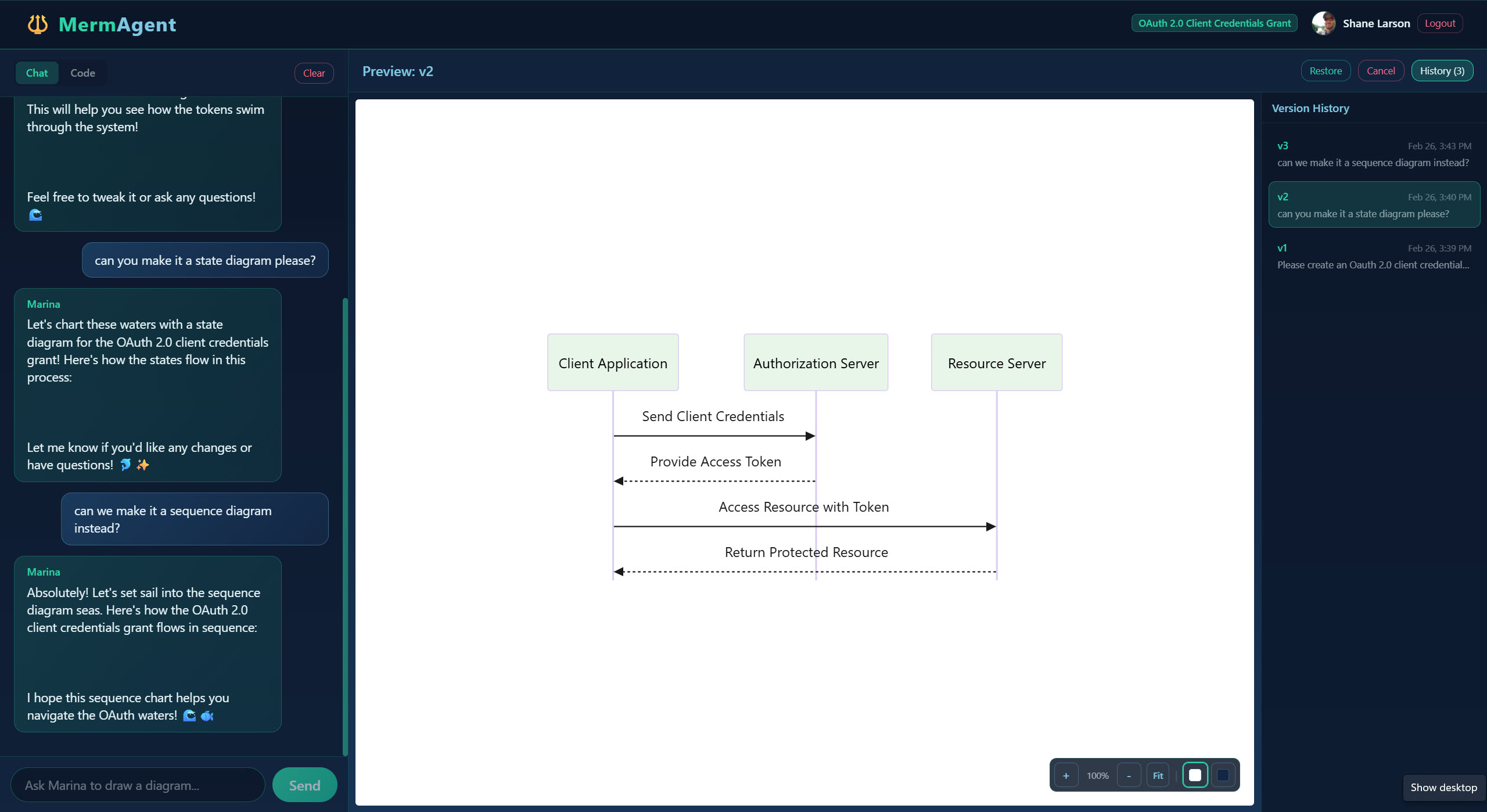
The architecture was simple by design. A split-panel layout: chat on the left, live diagram on the right. You type a message to an AI agent (I named her Marina, because if you're building a mermaid-themed product, you commit to the bit). Marina interprets your request, generates valid Mermaid.js syntax, and the diagram renders in real time on the right side of the screen.
For the tech stack, I made a series of deliberately boring choices. Next.js for the framework, because it handles both frontend and API routes in one project. Plain JavaScript, no TypeScript. I know that's a hot take in 2026, but for a solo developer moving fast on a new product, I don't want to argue with a compiler about whether something might be null. Bootstrap 5 for the UI, because I've been using it for years and can build layouts from muscle memory. PostgreSQL for the database. OpenAI's GPT-4o as the AI engine. Mermaid.js for rendering.
Every one of those choices was about removing friction. I didn't want to learn a new CSS framework at midnight. I didn't want to configure type definitions while the creative energy was flowing. I didn't want to debate architecture patterns with myself over a cold cup of coffee. I wanted to build the thing I saw in my head, and I wanted to build it NOW.
By midnight, I had a working prototype. I typed "draw a flowchart for a pizza ordering system" into the chat, and Marina generated a diagram with nodes for browsing the menu, adding items to cart, checkout, payment processing, and delivery tracking. It was correct. It was clean. It rendered instantly.
I leaned back from my screen and laughed out loud. Not because it was funny. Because it actually worked. That feeling when a prototype does the thing you imagined? It's one of the best feelings in software development, and it never gets old no matter how many times you've shipped something before. For about thirty seconds I just sat there grinning at a flowchart about pizza.
Then I started thinking about all the things I needed to build to make this a real product. The grinning continued, but for different reasons. I wasn't going to bed anytime soon.
The Decision That Made Everything Possible
I want to talk about the single most important design decision in MermAgent, because it's also the most counterintuitive one.
There is no way to directly edit the diagram.
You cannot click on a node and rename it. You cannot drag a box to a new position. You cannot right-click and select "add connection." The only way to modify the diagram is through the conversation with Marina.
When I tell other developers this, they usually look at me like I've made a terrible mistake. "What if someone just wants to fix a typo in a label?" Talk to Marina. "What if they want to rearrange the layout?" Talk to Marina. "What if they want to change a single color?" You know the answer by now.
Here's why this isn't a limitation. It's the entire product.
Building a visual diagram editor is an enormous engineering undertaking. Drag-and-drop with collision detection. Snap-to-grid. Undo and redo stacks that track spatial changes. Z-index management for overlapping elements. Multi-select with shift-click. Grouping and ungrouping. Alignment guides that pop up when things are almost lined up. A responsive canvas with smooth zoom and pan. Keyboard shortcuts for every single operation. Copy and paste that works across browsers. That's easily six months of focused work for a small team, and it's been done a hundred times before by companies with way more resources than one developer with a $5 server.
By removing all of that, I eliminated months of engineering work and also created something genuinely different. MermAgent isn't a worse version of Lucidchart or Draw.io. It's a completely different paradigm. You don't draw diagrams. You describe them. And for a surprising number of use cases, describing is faster and more natural than drawing.
Think about it. When you're explaining a system to a colleague at a whiteboard, you don't silently draw boxes. You talk while you draw. "OK so the request comes in here, hits the API gateway, then we check auth, and if that passes we route to one of these three services…" The drawing follows the explanation. MermAgent just cuts out the drawing part and lets you focus entirely on the explaining.
The constraint also means Marina is always in the loop. She doesn't just create the first version and then step aside while you pixel-push. She's your collaborator through every iteration. "Actually, make this a sequence diagram instead of a flowchart." "Add a database node between the API and the cache." "Show the error path in red." "Wait, let's start over and make it simpler." The conversation builds up a shared context, and each subsequent change gets smarter because Marina remembers what you've already discussed.
And here's the bonus I didn't fully appreciate until I was using the product myself: because every change is a chat message, you get version history for free. Every version of the diagram is tied to the message that created it. Want to go back to what the diagram looked like three iterations ago? Just scroll up through the conversation. It's the most natural version control system I've ever used, and I didn't even build it on purpose. It just fell out of the architecture.
From Prototype to Product: The Rest of the Night (and the Next Morning)
A working prototype is exciting. But a prototype is not a product. A product has user accounts. A product has billing. A product has error handling and security headers and a privacy policy and a terms of service page that nobody reads but everyone needs. The gap between "this works on my laptop" and "strangers on the internet can pay money for this" is always larger than you think it is.
Most people would go to bed and make a plan. I was too wired. The momentum was real, Claude Code was building features faster than I could dream them up, and I had a very clear picture of what "done" looked like. So I made another pot of coffee and kept going.
Letting People In: Authentication
First things first: letting people actually sign up. I integrated NextAuth.js with Google and GitHub OAuth, which means users can create an account in two clicks. No email verification flow to build and maintain. No "we sent you a link, check your spam folder" dance. No password reset emails. Just "Sign in with Google" and you're in.
A users table in PostgreSQL ties everything together. Every API route checks for a valid session before doing anything. Your boards belong to you and only you. The whole auth layer landed in about an hour.
A Place For Your Diagrams: Multi-Board Management
The prototype only had one board. That's fine for a demo, but a real product needs users to manage multiple diagrams. I built a dashboard page that shows all your boards as cards: board name, last modified date, and a little preview. Create a new board, give it a name, and you land in a fresh conversation with Marina. Come back to it a week later and your conversation history, your diagram, and every version in between are right where you left them.
There's something satisfying about seeing a dashboard fill up with your diagrams over time. It starts to feel like a workspace, not just a tool.
Show Me the Money: Stripe Billing
This is where the project stopped being a side project and started being a business.
I integrated Stripe end-to-end. Checkout sessions for upgrades. A customer portal where users can manage their payment method, view invoices, and cancel. Webhook handlers for all the lifecycle events: subscription created, payment failed, subscription cancelled, plan changed. The free tier gives you 3 boards and 25 AI messages per day, enough to get real value without hitting walls too quickly. The Pro tier at $10/month unlocks unlimited everything.
I have to give Stripe credit here. Their developer experience is genuinely excellent. The documentation is clear, the test mode is comprehensive, and the CLI tool for testing webhooks locally is a lifesaver. The full billing integration (checkout, webhooks, customer portal, plan enforcement, a pricing page, and a billing settings page) came together in a single session. I tested the webhook flow locally with the Stripe CLI and had the entire lifecycle working on the first try.
That almost never happens with payment integrations. I kept waiting for something to break. It just… didn't. (I'm knocking on my desk as I type this.)
Protecting the AI: Rate Limiting
Every AI message costs real money. OpenAI charges per token, and a user who decides to write a novel in the chat interface could rack up costs fast. So rate limiting isn't just a nice-to-have; it's survival.
Redis counters track daily message usage per user. The UI shows a friendly counter: "18 of 25 messages used today." When you hit the limit, instead of a cold error message, you get a warmly worded note explaining what happened and an option to upgrade if you want more.
The tone matters here. A lot. Nothing kills a user's enthusiasm faster than a harsh "LIMIT EXCEEDED" error when they're in the middle of a creative flow. The message is more like, "You've used all 25 of your free messages today. They'll reset tomorrow morning, or you can upgrade to Pro for unlimited messages." Respectful. Informative. Not pushy. It treats the user like a person, not a resource to be managed.
First Impressions: The Landing Page
I wanted the landing page to feel like the product itself. MermAgent has an ocean theme running through the entire UI (mermaid… ocean… you get it), and the marketing page continues that visual language. Soft blues and teals. A hero section with an animated diagram preview that shows Marina in action. A features section highlighting conversational editing, version history, and instant rendering. A pricing comparison with the classic three-column layout.
I also built out all the professional essentials that make a product feel trustworthy: Open Graph images for social sharing (so the link looks good when you paste it in Slack), a proper favicon set, SEO meta tags, a terms of service page, and a privacy policy. These aren't glamorous to build, but they're the difference between "some random app I found online" and "a product I'd actually sign up for."
The Unsexy But Essential Stuff
Then came the work that nobody writes blog posts about but everybody needs. I'm going to list it because I think it's important for other builders to hear: this stuff takes real time and you should plan for it.
CSRF protection on all state-changing routes. Content Security Policy headers to prevent cross-site scripting. Input sanitization on every user-provided field. Sentry integration for error tracking, so I know when something breaks in production before users have to tell me about it. Structured logging with Winston so I can actually debug issues instead of staring at a blank console. A health check endpoint that verifies the app, database, and AI service are all responsive.
GDPR compliance: a cookie consent banner, a data export feature so users can download all their data, and a full account deletion flow that cascade-deletes everything. Boards, messages, diagram versions, the user record itself. Gone. If someone wants their data deleted, it should actually be deleted. That seems obvious, but you'd be surprised how many SaaS products get this wrong.
None of this work is exciting. All of it is necessary. And getting it done in the same session as everything else, rather than scrambling to bolt it on weeks later after a security scare, felt like the right call.
The $5 Launch
OK, here's the part that makes people do a double-take.
MermAgent launched on a $5/month DigitalOcean droplet.
Five dollars. Per month. That's the entire hosting bill. And the whole thing, from first line of code to live in production, took about 24 hours.
The PostgreSQL database was already running on infrastructure I had available. SSL is free through Let's Encrypt. The domain was a few dollars for the year. AI costs are usage-based through OpenAI, which means they scale with actual usage rather than being a fixed overhead eating into my bank account from day one.
At launch, the total monthly infrastructure cost is roughly the price of a fancy coffee. Maybe a fancy coffee and a muffin if I'm being generous with the math.
I'm not saying this to brag. (OK, I'm saying this to brag a little bit.) I'm saying it because there's a widespread assumption in the tech industry that launching a SaaS product requires significant upfront infrastructure investment. Managed Kubernetes clusters. Multi-region deployments. A CDN in front of everything. Load balancers with health checks. Auto-scaling groups with carefully tuned thresholds. Terraform files longer than your application code.
You know what a brand new SaaS product with zero users actually needs? A server that stays on. That's it. That's the list.
The architecture is a Next.js monolith. One application handles the frontend, the API routes, the AI integration, and the static pages. PostgreSQL stores everything. It's simple, it's fast, and when something goes wrong at 2 AM, I can reason about the entire system in my head without consulting an architecture diagram. (Which would be ironic, given what the product does.)
When MermAgent outgrows a single droplet, the scaling path is clear: bigger droplet first (still cheap), then separate the database to its own managed instance, then add Redis for caching and sessions, then think about horizontal scaling if traffic actually warrants it. But I'll cross those bridges when paying customers build them for me.
Starting lean means the product needs only a handful of Pro subscribers to be completely self-sustaining. There's something psychologically powerful about that. I'm not burning runway and praying to reach profitability before the money runs out. The economics work from day one, and every new subscriber makes them work better.
Let's Talk About AI-Assisted Development (Honestly)
I used Claude Code as my primary development partner for this entire project, and I want to be straightforward about what that experience was actually like. There's a lot of hype right now about "vibe coding" and AI building entire applications from a single prompt, and the reality is more nuanced than the Twitter threads and YouTube thumbnails suggest.
Here's what AI-assisted development gave me: speed. Extraordinary, almost disorienting speed. The kind of speed where you finish a feature and have to sit there for a second because your brain hasn't caught up with the fact that it's done. I would describe a feature in plain language ("add version history with a sidebar that shows all past versions and a restore button") and Claude would build it. Working code. Correct API endpoints. Proper database queries. UI components that matched the existing design language and ocean theme. Features that would normally fill a full day of work were landing in thirty to forty minutes.
Bug fixes were even faster. "The create board button fails silently when you're on the free tier and already at your board limit." Ten minutes later, there's a properly styled error card with a coral-colored background, a message explaining the limit, and a button linking to the upgrade page. Not just a fix, but a fix with good UX. I barely had time to refill my coffee.
Here's what AI-assisted development did NOT give me: product judgment. Taste. Prioritization. The sense of when to cut scope. The instinct for which features matter and which ones are distractions. Knowing when a design feels right versus when it feels like "an AI built this." The courage to ship something imperfect.
Every single product decision was mine. What to build. What not to build. How the pricing should work. What the error messages should sound like. When to ship and when to keep polishing. Whether to launch without collaboration features or wait another month. The AI was an incredibly fast pair of hands, but the brain directing those hands was human.
I think this is the part that gets lost in the AI development hype cycle. The bottleneck in building software was never really typing speed. It was always decision-making, taste, and the discipline to ship something before it's perfect. AI tools dramatically compress the time between "I've decided what to build" and "it's built." But they don't help you decide what to build in the first place. That's still on you.
The combination worked so well on this project because I came to every session with clear decisions already made. JavaScript, not TypeScript. Bootstrap, not Tailwind. Conversation-only editing. Three pricing tiers. Ocean theme. No real-time collaboration in V1. Each sharp decision eliminated a whole category of ambiguity, and the AI could move at full speed because it had a clear, specific target to aim at.
If I'd shown up and said, "build me a diagramming tool, figure out the details," the result would have been mediocre at best. The magic isn't in the AI. The magic is in the clarity of the vision that the AI is executing on.
What Marina Can Actually Do
I've been talking a lot about the development process, so let me actually show off the product for a minute. Because Marina is genuinely impressive, and I say that as someone who stress-tested her relentlessly before hitting deploy.
MermAgent supports the full range of Mermaid.js diagram types, and Marina handles all of them:
Flowcharts are the bread and butter. "Draw a flowchart for the user registration process" gives you a clean decision tree with branching paths for email verification, OAuth, error handling, and whatever else you describe. This is probably what 60% of users will reach for first.
Sequence diagrams are perfect for API design and system integration work. "Show the sequence of calls between the frontend, API gateway, auth service, and database when a user logs in." Marina maps out every request and response, every arrow between participants, every return value.
Class diagrams for object-oriented design. State diagrams for modeling complex state machines. Entity relationship diagrams for database schema design (this one is phenomenal for early-stage database planning). Gantt charts for project timelines. Pie charts for quick data visualization. User journey maps for UX research. Git graphs for visualizing branching strategies. Mindmaps for brainstorming sessions.
And here's the thing that keeps surprising me even now: Marina doesn't just generate diagrams from single prompts. She iterates on them intelligently. She remembers the context of your entire conversation. If you spent ten messages building up a complex architecture diagram and then say "actually, add a message queue between the API and the notification service," she knows exactly where to put it because she's been part of the entire design conversation. She has context that a one-shot prompt-and-generate tool could never have.
That conversational memory is what makes MermAgent feel less like a tool and more like a collaborator. It's the difference between talking to a search engine and talking to a colleague who's been in the meeting with you from the start.
What's Next
MermAgent is live today as a solid, usable product. I built and launched it in about 24 hours. The core loop is working and it's genuinely fun to use (I keep accidentally creating diagrams for things that don't need diagrams, just because it's satisfying). And there's a clear roadmap for what comes next.
Real-time collaboration is the big one. Multiple people on the same board, watching the diagram evolve as the conversation unfolds. Imagine a team architecture session where everyone's in the same MermAgent board, and instead of fighting over who's dragging which box in Miro, you're all contributing to a conversation with Marina. She synthesizes everyone's input into a coherent diagram. That's the dream scenario, and the technical architecture is designed from the ground up to support it when the time comes.
Expanded exports are on the near-term list: SVG for crisp vector output at any size, PDF for embedding in documents, and clipboard integration so you can paste diagrams directly into your slide decks and design docs.
Team workspaces with admin controls, pooled AI usage across team members, and proper role-based access control are planned for organizations that want to adopt MermAgent as a team tool rather than an individual one.
And longer term, a public API so developers can embed MermAgent's conversational diagram generation into their own tools and workflows. Imagine a Slack bot where you type "/diagram draw a sequence diagram for the checkout flow" and it generates and posts the result. That's on the horizon.
But even right now, as a single-user tool, the core experience delivers something that I genuinely think is new. Describe what you want. Watch it appear. Iterate through conversation. Export when you're done. It's faster than any visual diagramming tool I've used, and I catch myself smiling while I use it. That's not something I've ever said about a piece of software that draws boxes and arrows.
The Takeaway (For Fellow Builders)
If you're a developer with an idea for a micro-SaaS product, or if you've been thinking about building something but keep talking yourself out of it, here's what I learned from this experience:
Start with your own frustration. The best product ideas come from problems you've personally experienced and are personally annoyed by. I didn't do market research to discover that diagramming tools are clunky. I sat in a meeting and watched it happen in real time. That frustration gave me conviction, and conviction is what gets you through the boring parts of product development (hello, GDPR compliance).
Make sharp decisions early and don't second-guess them. Every technology choice I made was about eliminating ambiguity and moving faster. I didn't evaluate five CSS frameworks. I picked the one I know. I didn't debate TypeScript versus JavaScript. I picked my preference and moved on. Those decisions cost me nothing and saved me hours of hemming and hawing and Stack Overflow rabbit holes.
Ship before you're ready. MermAgent doesn't have real-time collaboration yet. It doesn't have SVG export. It doesn't have team workspaces. It launched anyway, because a live product with a few missing features beats a perfect product that lives forever on your localhost. You can always add features. You can't add back the months you spent perfecting something nobody's using.
Infrastructure can be laughably simple. A $5 server is enough to launch a SaaS product. Full stop. You can always scale up when you need to. You can never get back the time you spent over-engineering infrastructure for users who don't exist yet.
AI tools are force multipliers, not replacements. Claude Code is the reason 24 hours was enough. But faster at building the wrong thing is still building the wrong thing. The leverage comes from combining clear product thinking with fast execution. Bring the vision. Let the AI bring the velocity.
Try It Yourself
If you've ever spent twenty minutes trying to get two boxes to connect properly in a diagramming tool, or if you've ever wished you could just describe the diagram you see in your head and have it appear on screen, MermAgent was built specifically for that frustration.
The free tier gives you 3 boards and 25 AI messages per day. That's enough to build a few real diagrams and see if conversational diagramming clicks for you the way it clicked for me that Tuesday evening when I should have been paying attention in a meeting.
Go to mermagent.com, sign in with Google or GitHub, and tell Marina what you want to draw. Start simple: "draw a flowchart for making coffee." Then try something real from your actual work. I think you'll be surprised at how natural it feels and how fast you can go from a blank canvas to a diagram you'd actually put in a presentation.
And if you build something cool with it, I genuinely want to see it. Find me at grizzlypeaksoftware.com.
Happy diagramming.
Shane is the founder of Grizzly Peak Software and the creator of MermAgent. He builds software products, writes about the experience, and remains deeply suspicious of any diagramming tool that requires a tutorial video longer than 30 seconds.