Building an EPUB Viewer in One Night with Claude Code
I built an open-source EPUB reader in one night using Claude Code — drag, drop, read, and analyze your book before it goes live.
I needed a way to test my books before they go live. Every author knows the moment — you've exported your manuscript to EPUB, and now you need to actually read it. Check the formatting. Make sure chapters flow right. Catch those sentences that looked fine in a text editor but run on forever in an e-reader.
The existing options were clunky. Desktop apps that feel like they were designed in 2005. Online tools that want you to create an account. I wanted something simple: drag a file in, start reading, get useful feedback about the writing. So I opened Claude Code and described what I wanted.

USB-C for AI Is Already Here. Are You Building With It?
MCP is how Claude, Cursor, and VS Code connect AI to the real world. This is the complete technical guide.
Build Your First MCP Server — $3.99What came out of that session is now open source on GitHub: grizzlypeaksoftware/epub-viewer.
The Build
The whole thing started with a single sentence in a project file: "I would like to make an e-pub viewer/reader. I prefer the app to be built in JavaScript, no TypeScript. Bootstrap. It is for testing my books before go live and to check for issues/readability."
Claude Code put together a plan — Express.js backend, epub.js for rendering, Docker for deployment. Seven steps, each one building on the last. Within minutes, the scaffolding was up: a package.json with three dependencies, an Express server handling file uploads, a landing page with a drag-and-drop zone, and a reader page powered by epub.js.
The first version worked, but navigation was off. Clicking "Next" jumped entire chapters instead of turning pages. This turned out to be a sizing issue — epub.js needs explicit pixel dimensions to calculate page breaks, not CSS percentages. One fix later, and suddenly the reader felt like an actual book.
Making It Look Good
The initial UI was functional but plain. I asked Claude to "snaz it up" — and the transformation was dramatic.
The landing page got a dark gradient background with floating animated particles and glassmorphism cards. The reader got a refined navbar, a clean TOC sidebar with accent borders, and three polished themes: Light, Sepia, and Dark.
Then I asked to shift from purple to navy blue. The entire color system recalibrated — gradients, particles, glows, hover states, active indicators — all retuned to a sophisticated navy palette. Subtle refinements piled on: custom scrollbars, animated gradient backgrounds, a gentle logo pulse, softer shadows, tighter typography.
The Analysis Tool
This is where it got interesting. Since the app was built for pre-publication testing, I asked: "Do you think it would be useful to have some kind of analysis tool?"
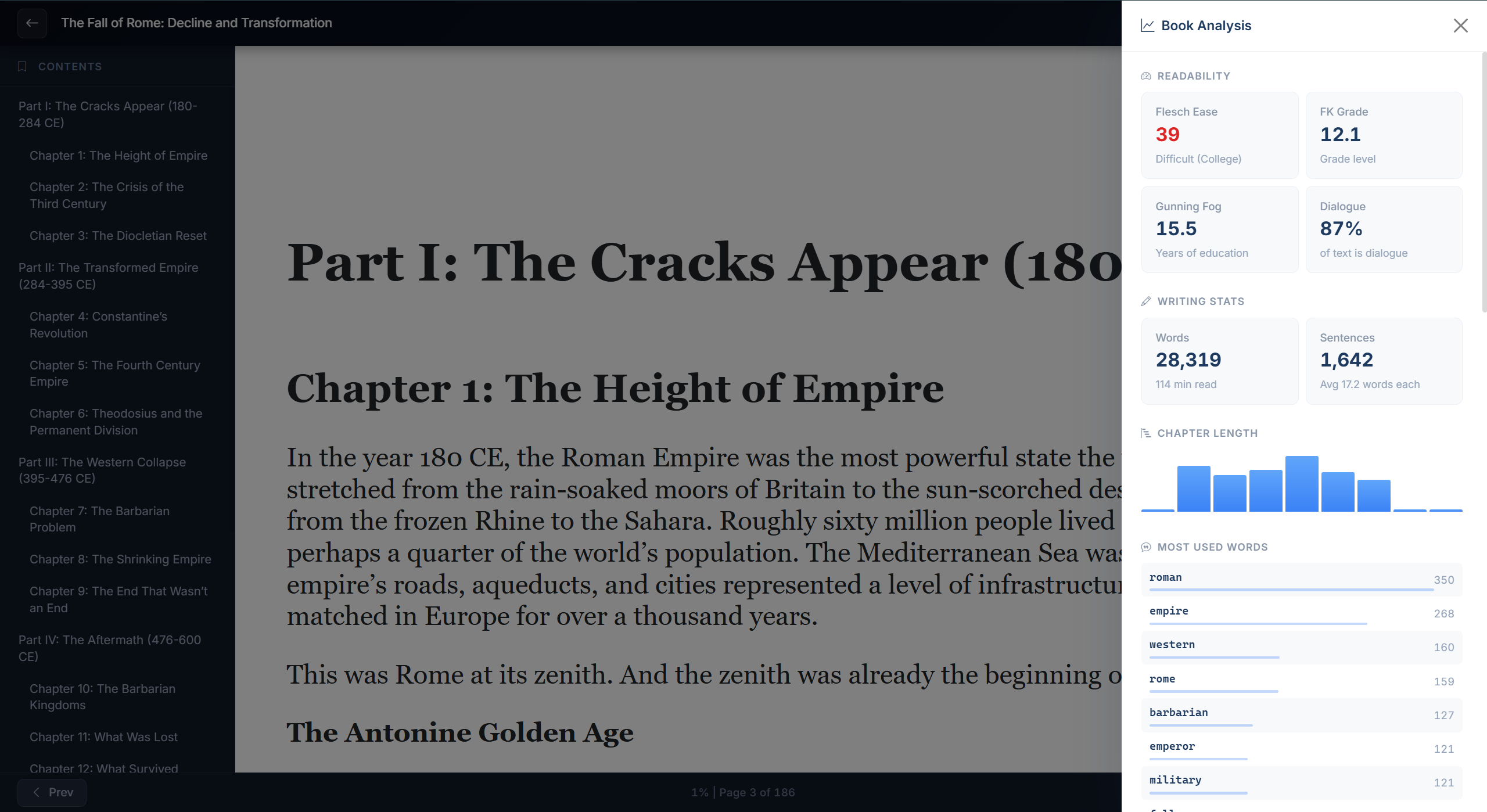
The answer was a full readability analysis engine that runs entirely in the browser:
- Flesch Reading Ease and Flesch-Kincaid Grade Level — industry-standard metrics that tell you if your writing matches your target audience
- Gunning Fog Index — how many years of education a reader needs to understand your text
- Dialogue ratio — what percentage of your book is dialogue vs. narrative
- Chapter length visualization — a bar chart showing whether your chapters are balanced or wildly uneven
- Word frequency analysis — your top 20 most-used words (stop words excluded), so you can catch repetition
- Long sentence detection — flags any sentence over 40 words, because those are almost always worth breaking up
The server just hosts files. Every bit of analysis happens client-side by parsing the EPUB's actual content.
The Technical Decisions
What I appreciate about how this was built is what it doesn't include.
No build system. No webpack, no bundler, no transpilation step. The JavaScript files are served directly. When you edit a file, you see the change immediately.
No database. Uploaded files live on disk. Reading preferences live in localStorage. For a personal tool, that's exactly right.
No TypeScript. Plain JavaScript that anyone can read and modify.
No npm packages for the frontend. Bootstrap, epub.js, and JSZip all load from CDNs. The server has three dependencies: Express, Multer, and UUID.
The entire project is about 1,200 lines of code across six files. It runs in Docker with a single docker-compose up --build.
epub-viewer/
  index.js              Express server
  public/
    index.html           Landing page (upload)
    reader.html          EPUB reader page
    css/styles.css       Custom styles & themes
    js/
      upload.js          Drag-drop & file upload
      reader.js          epub.js integration & controls
      analysis.js        Book analysis engine
What I Learned
Building software with Claude Code isn't about typing less — it's about thinking at a higher level. Instead of debugging CSS grid layouts, I was making decisions about what the tool should do. Instead of reading epub.js documentation for an hour, I described the reading experience I wanted and worked through the implementation together.
The bugs were real and required real problem-solving. The iframe sandbox error. The pagination issue with percentage-based dimensions. The epub.js spine API that behaves differently in the CDN build than you'd expect from the source. Each one got solved, but none were trivial.
The result is a tool I actually use. Every time I export a manuscript, I drag it into EPUB Viewer, flip through the pages, check the analysis panel, and catch things I would have missed. That's the whole point — it exists to make books better before readers ever see them.
Try It Yourself
EPUB Viewer is open source under the MIT license. Clone the repo, run npm install && npm run dev, and open http://localhost:3000. Or use Docker:
docker-compose up --build
Drop in any EPUB file and start reading.
The code is simple enough to modify. Want a different color scheme? Edit one CSS file. Want to add a new analysis metric? The analysis engine is a single JavaScript file with clean, readable functions. Want to deploy it for your whole team? The Docker setup handles that.
→ github.com/grizzlypeaksoftware/epub-viewer
Sometimes the best tools are the ones you build for yourself.
Shane Larson is the founder of Grizzly Peak Software and has been writing software for over 30 years from a cabin in Caswell Lakes, Alaska.